
Executive Overview
The landscape of workplace productivity software has officially entered the era of agentic AI. Prior to mid-2026, generative AI tools operated almost exclusively on a reactive paradigm: a human user input a discrete prompt, the large language model processed the request, generated an output, and went dormant. While this significantly lowered the barrier to content creation and search, it still imposed a high cognitive load on the user, who remained responsible for initiating, chaining, and auditing every digital interaction.
Announced at Microsoft Build 2026, Microsoft Scout represents an important shift from conversational assistance to autonomous execution. Positioned as the foundational offering in a new class of enterprise AI software called Autopilots, Scout is a persistent, always-on personal agent designed to work proactively on a user’s behalf. Rather than waiting for a text command, Scout runs constantly in the background of the Microsoft 365 environment, tracking workflows, parsing communication signals across Teams and Outlook, navigating local files, and independently executing multi-step coordination tasks.
By anchoring Scout within an enterprise governance framework—specifically using independent identity states and system-enforced isolation boundaries—Microsoft is attempting to solve the classic security and scalability bottlenecks that have previously stalled the adoption of autonomous digital agents in regulated workplaces.
Architecture and Technical Foundation
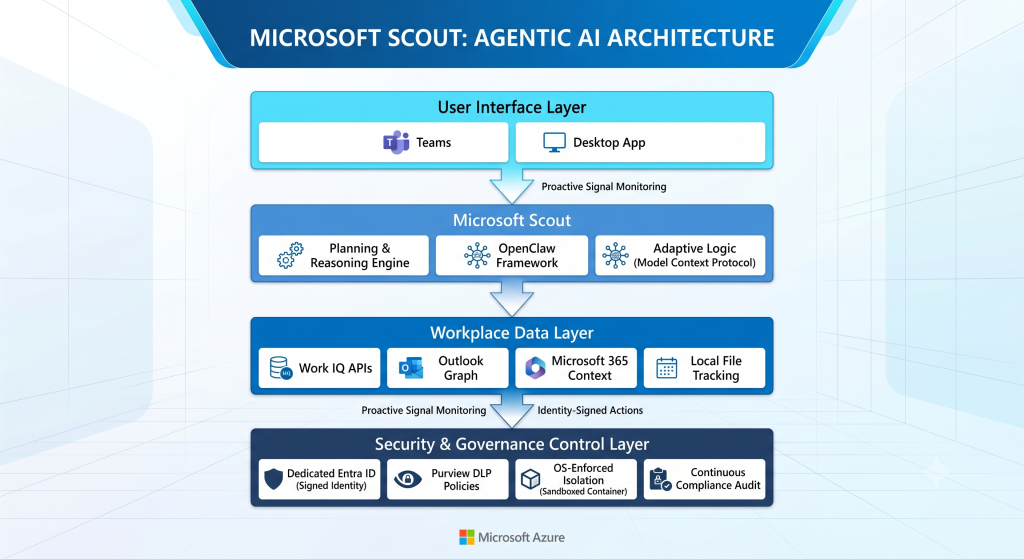
Scout’s capability to operate autonomously without human intervention rests on a newly engineered multi-layer architecture that bridges open-source flexibility with rigid corporate cloud controls.
The OpenClaw Execution Engine
Scout is built on top of OpenClaw, an open-source AI agent framework that rapidly gained traction across the development community in late 2025 and early 2026. By commercializing OpenClaw within its ecosystem, Microsoft has tapped into a highly optimized logic engine capable of complex, multi-step execution. Scout utilizes OpenClaw’s structural planning and memory patterns to dynamically assess abstract user goals, break them down into granular micro-tasks, and continuously evaluate its own progress.
The Work IQ Grounding Layer
To ensure that an always-on agent remains grounded in authentic corporate reality, Scout relies on Microsoft’s newly rolled-out Work IQ engine. Work IQ functions as the enterprise intelligence substrate, mapping how an organization operates in real-time by analyzing the connections between people, emails, document lifecycles, and calendar availability across Microsoft 365. Through the Work IQ APIs, Scout maintains a continuous, semantic understanding of a user’s true workplace priorities.
Dedicated Execution Containers
A major inhibitor to autonomous agents has been the risk of unchecked code execution or arbitrary API manipulation within a user’s live session. Scout mitigates this by running inside operating system-enforced execution containers. These specialized sandboxes isolate the agent’s background reasoning paths from the active desktop environment. If Scout executes an automated python script to manipulate an Excel sheet or connects to an external database via a Model Context Protocol (MCP) server, it does so within a contained, heavily monitored environment, eliminating the risk of unmanaged desktop manipulation.
Key Features and Capabilities
Scout acts as a digital proxy for administrative and coordination workflows, operating across cloud endpoints, desktop installations, and web interfaces. Its primary operational capabilities include:
-
- Autonomous Meeting Engineering: Scout continuously monitors calendars across multiple time zones. It proactively flags impending scheduling conflicts, negotiates alternative availabilities directly with peer agents, and aggregates necessary background materials—such as recent thread histories, PowerPoint decks, and reference links—into an agenda package ahead of the meeting.
-
- Proactive Information and Inbox Triage: Rather than performing basic text summaries when clicked, Scout actively sifts through high-volume message queues in Outlook and Teams. It groups incoming communication by project context, drafts context-aware responses to routine questions, and alerts the user only when a high-priority, human-required intervention is detected.
-
- Dynamic Decision Risk Detection: By analyzing ongoing conversation velocity and deadline commitments stored within M365 workspaces, Scout is designed to flag organizational friction, such as stalled project approvals or missing operational deliverables, allowing users to step in before project deadlines are compromised.
-
- Localized Context Extension: While primarily interacting with users through a unified Teams interface, a dedicated Windows desktop application allows Scout to safely expand its tracking boundaries to include local file modifications, active browser tracking, and localized edge compute resources.
Security, Governance, and Identity
The core differentiator separating Scout from consumer-grade personal agents is its enterprise-grade compliance profile. Microsoft has built Scout to operate within existing enterprise security policies rather than bypassing them.
-
- Individual Entra ID Attribution: Unlike traditional background scripts or unmanaged AI plug-ins that execute under a generic system service account, each individual Scout agent operates under its own governed Microsoft Entra ID identity. This design means that every automated action—whether sending an internal memo, updating a SharePoint file, or querying a database—is cryptographically signed by that specific agent.
-
- Scoped and Redacted Credentials: Any authentication token generated by Scout to accomplish a task is narrowly scoped to that specific transaction. Furthermore, credential details are scrubbed entirely from system diagnostics and audit logs to prevent identity theft or privilege escalation within the model’s memory.
-
- Real-Time Purview Policy Application: Scout cannot read data or access endpoints that the human user does not have permission to view. Microsoft Purview data loss prevention (DLP) parameters and compliance labels apply automatically at the exact moment of execution, preventing the agent from accidentally writing sensitive internal information to an insecure channel or forwarding data outside the tenant boundary.
Use Cases
Scout’s autonomous feature design makes it highly valuable for optimization across complex corporate environments:
-
- Executive Administrative Automation: High-level corporate managers can offload their scheduling, travel orchestration, agenda creation, and basic follow-up tracking to Scout. The agent coordinates with other administrative agents across the organizational directory to align schedules, book corporate resources, and keep daily calendars organized.
-
- Project Management Oversight: In large-scale software or infrastructure engineering deployments, Scout acts as an automated project manager. It continuously crawls task boards, flags stalled code reviews or missing approvals, and automatically alerts stakeholders to project bottlenecks without requiring manual data extraction.
-
- Customer Support and Account Triage: Account managers can task Scout with tracking client accounts. Scout monitors incoming customer emails, links requests to internal account histories via Work IQ, drafts preliminary resolution emails, and stages the ticket inside the CRM backend for the account manager to sign off on.
Strategic Alternatives
Organizations mapping out their long-term autonomous agent strategies may consider several alternative paths:
-
- Google Gemini Advanced and Google Workspace Agents: Google’s ecosystem focuses on a deeply integrated workspace agent strategy powered by Gemini. While Google’s tools offer strong cross-application functionality inside Google Docs, Sheets, and Gmail, they typically lack the rigid, enterprise-first governance, individual Entra ID attribution, and local desktop sandboxing native to Microsoft’s enterprise architecture.
-
- Anthropic’s “Orbit” (Rumored/In Development): Anthropic is actively developing an enterprise-focused proactive agent under the codename Orbit, designed to tie closely into developer and creative tools like GitHub, Figma, and Slack. Orbit promises deep reasoning, but it will require organizations to manage secondary security perimeters and separate API integrations compared to the native Microsoft 365 stack.
-
- Custom Framework Deployments (LangGraph / AutoGen): Technology teams can build completely bespoke personal agents utilizing advanced open-source libraries. This approach provides maximum control over model selection and custom business logic, but it demands massive internal engineering overhead to build out equivalent enterprise security, identity tracking, and audit logging features from scratch.
An Alternative Perspective: Technical & Operational Risks
A balanced evaluation of Scout requires looking past early automation promises to address the operational realities of letting autonomous systems run unprompted inside an enterprise communications stack.
The Latent Error Propagation Loop
Because Scout operates in a continuous loop without waiting for direct human input, it introduces a risk of automated error propagation. If the model misinterprets an ambiguous phrase in an incoming email, it might autonomously adjust a calendar block, decline an important client invitation, or send an inaccurate, pre-drafted status update to an executive team. In a high-velocity corporate environment, a minor reasoning error at the start of a chain can quickly escalate into widespread administrative confusion before a human operator notices the drift.
Furthermore, relying heavily on a system like Work IQ can give users a false sense of security regarding the agent’s actual situational awareness. A digital tracking layer can catalog calendar entries and emails, but it remains blind to informal workplace dynamics—such as a verbal agreement made during a coffee break, a shifting team hierarchy, or sensitive corporate situations not explicitly documented in text. An always-on agent acting without this implicit context could take premature or inappropriate actions, meaning organizations must maintain strict “human-in-the-loop” approval gates for sensitive or high-impact business decisions.
Final Thoughts
Microsoft Scout represents an important step toward the industrialization of agentic AI within the enterprise. By utilizing an open-source core in OpenClaw and placing it inside a secure, identity-attributable container framework, Microsoft has established a credible path for deploying autonomous software in highly audited workplaces. For organizations looking to reduce administrative friction and optimize everyday coordination, Scout delivers a powerful glimpse into the future of digital work. Long-term success, however, will not depend on how fast these agents can run, but on how carefully IT administrators configure their internal governance boundaries to ensure that autonomous productivity does not turn into automated operational drift.
Source
To see a practical breakdown of how this software handles background coordination and to better understand its core mechanics, you can watch this video review titled Introducing Microsoft Scout. This brief overview provides real-world examples of the agent managing tasks and outlines the technology stack driving its autonomous execution.